VAT return records checklist
Tell a VAT-registered client exactly what to send you for each VAT quarter.
Send it to VAT clients at the end of each quarter, or use it to check your own records are complete before you file a VAT return through Making Tax Digital software.
Edit the fields and wording, then type your answers or print.
Download PDFPrint and fill in by hand.
Free to use and adapt · 2 pages · A4 · No signup
What’s in the form?
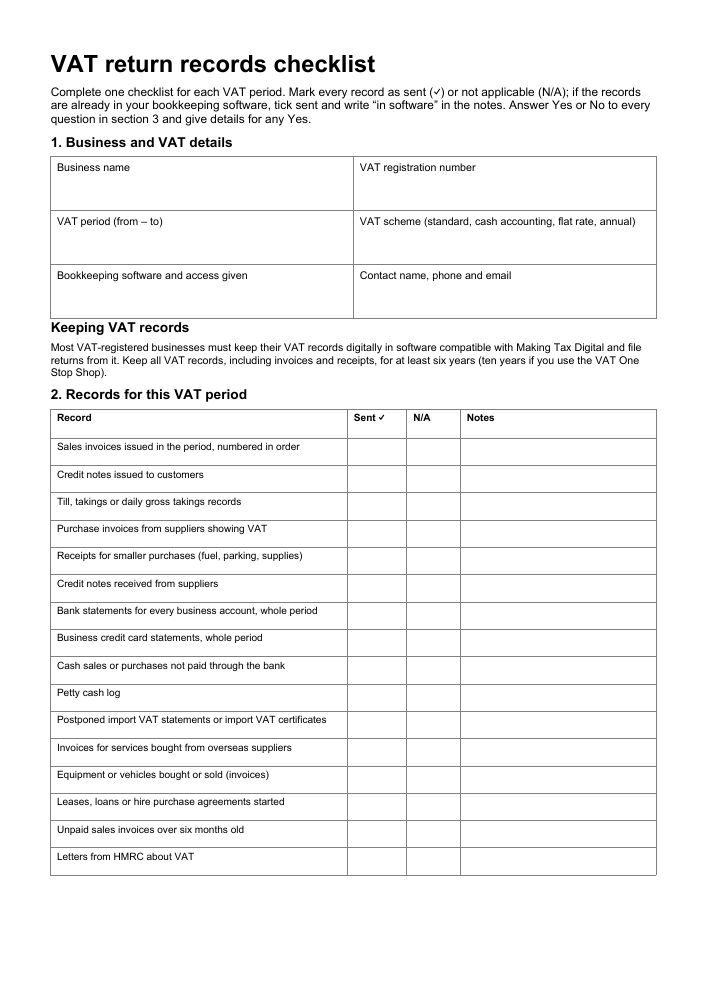
- Business name, VAT registration number, VAT period and accounting scheme
- Sixteen record types covering sales, purchases, bank, imports and assets
- Sent and not-applicable columns with space for notes
- Six yes/no questions on VAT rates, exempt sales, overseas trade and private use
- Making Tax Digital and record-keeping reminder
- Client declaration with signature and date
Make it your own
Add your practice name and the date you need records by in Word. Delete rows that never apply, such as imports or retail schemes, and name the bookkeeping software you use with the client.
More forms for accountants and bookkeepers
Stop chasing clients for missing answers
Upload this questionnaire, or your own, to screenmyform.com. Incomplete client returns go straight back with a list of what to fix. Free for up to 50 a month, no card needed.
Check completed copies of this form How accountants use it View pricing